How to reset Password
9TH AFREHEALTH ANNUAL CONFERENCE
How to Reset Your Password
A quick step-by-step guide to regaining access to your conference account.
If you have forgotten your password or are unable to log in, follow the simple steps below to reset it and regain access to your account on the AFREhealth events portal.
1
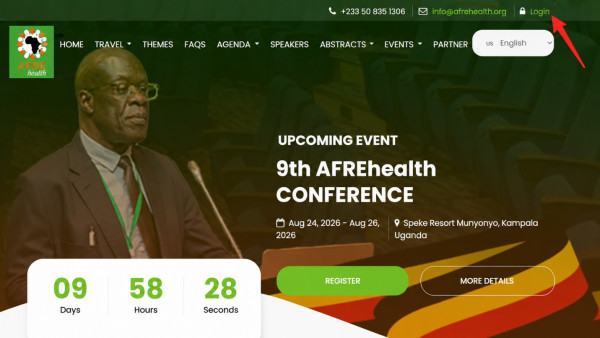
Go to the login page
Visit events.afrehealth.org and click Login at the top-right corner of the website, as shown below.
2
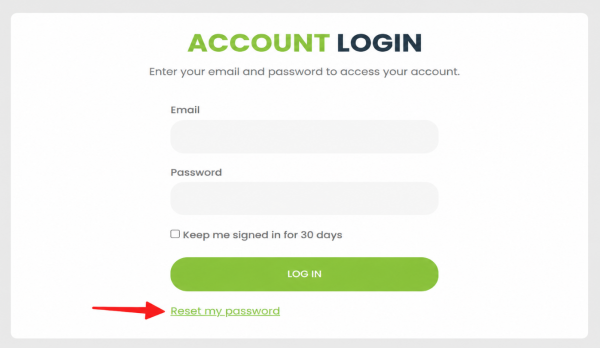
Click “Reset Password”
On the login screen, locate and click the Reset Password (Forgot Password) link, as shown below.
3
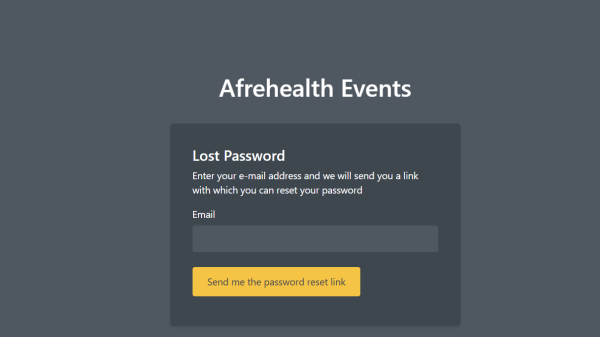
Enter your registered email
Type in the email address you used to register for the conference, then submit the request.
4
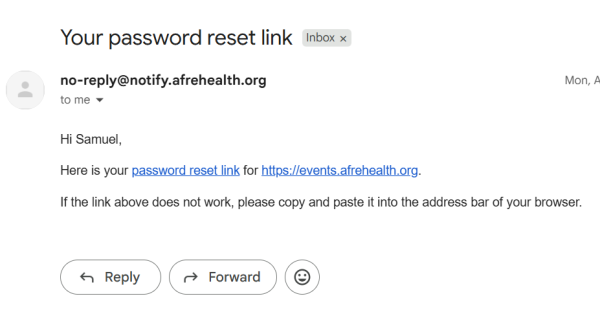
Check your inbox & set a new password
Open your email inbox (or spam/junk folder), click the password reset link, and set your new password.
💡 Helpful Tips
- If the reset email does not arrive within a few minutes, check your spam or junk folder.
- Be sure to use the same email address you registered with for the conference.
- Choose a strong password you can easily remember.
Still need help?
If you continue to experience difficulties, our support team is happy to assist.
Contact Support